VisionOPS
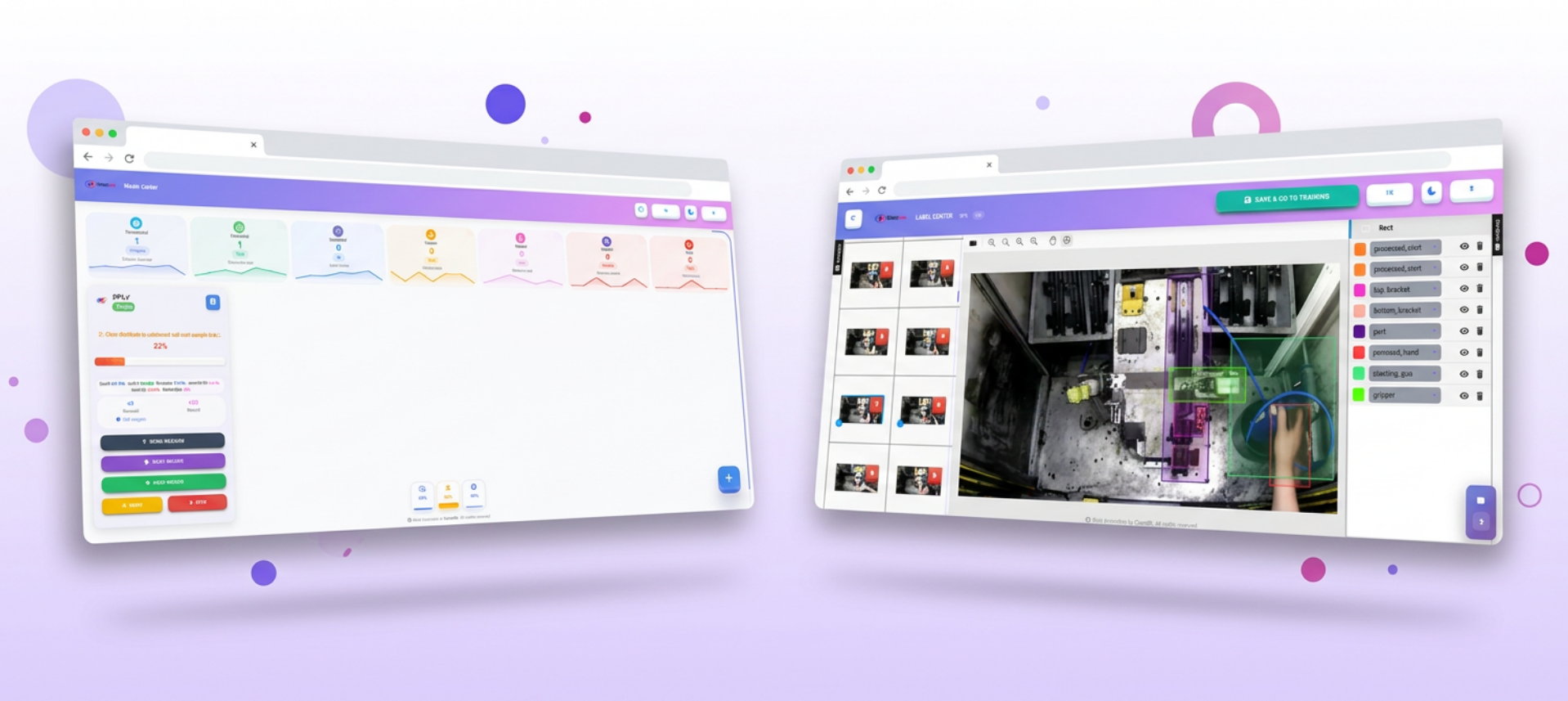
No-code AI computer vision training platform — annotate datasets, extract frames from video, train object detection and classification models, monitor training in real time, compare models, and export results, all without writing a single line of code
Country
TR
Time Frame
2025 - present
Industry
AI & Computer Vision
Project Type
SaaS Platform
Services
No-Code CV Training, Dataset Annotation, Video Frame Extraction, Dataset Versioning & Diff, Dataset Pre-Analysis & Auto-Fix, Object Detection Model Training, Classification Model Training, Real-time Training Monitoring, Model Registry & Versioning, Model Comparison, Industrial API Integration, Multi-Sector Deployment, Model Export
Technologies
Python, React, HTML, CSS
About the Project
VisionOPS is a no-code AI computer vision training platform that puts the full power of deep learning into the hands of non-technical users. From raw images and video footage to a production-ready model — everything happens inside a single browser-based interface. Teams can build, train, evaluate, and download object detection and image classification models without installing a single dependency or writing a single line of code.
Dataset Management
- Upload images individually or in bulk — supports JPG, PNG, BMP, and TIFF formats
- Automatic frame extraction from uploaded video files — select FPS rate to control dataset density instantly
- In-browser image editor for cropping, rotating, brightness/contrast adjustments, and resizing before annotation
- Dataset pre-analysis engine: automatically detects class imbalance, duplicate images, low-resolution samples, mislabelled bounding boxes, empty annotation files, and truncated images — with one-click auto-fix for correctable issues
- Improvement recommendations engine: suggests augmentation strategies, minimum sample counts per class, and labelling consistency fixes based on dataset statistics
Annotation
- Built-in bounding box annotation tool with class selector, zoom, and pan — no external labelling tool needed
- Polygon and segmentation mask annotation support for instance segmentation tasks
- Keyboard shortcut-driven labelling workflow for high-speed annotation
- Annotation export in YOLO TXT, COCO JSON, Pascal VOC XML formats
- Auto-annotation assistance: AI pre-labels images using an already-trained model so annotators only review and correct
Model Training
- Full support for modern object detection and instance segmentation models
- Classification model training with leading modern architectures
- Configurable hyperparameters: epochs, batch size, learning rate, image size, augmentation pipeline, optimizer, and early stopping
- One-click training start — model selection, dataset split (train/val/test), and config generation handled automatically
- Training controls: start, stop, pause, and resume — training state is persisted so paused runs can continue without data loss
- Transfer learning from pre-trained COCO weights or custom checkpoint uploads to accelerate convergence on small datasets
Real-time Training Monitoring
- Live training dashboard with real-time charts: loss curves (box loss, object loss, class loss), mAP@0.5, mAP@0.5:0.95, precision, recall, and F1 score — updated every epoch
- Per-class metrics table with individual AP, precision, and recall breakdowns
- Confusion matrix visualisation with interactive class-level drill-down
- GPU utilisation, memory usage, and estimated time-to-completion displayed live
- Training log stream — raw stdout from the training process streamed directly to the browser console panel
Model Comparison & Analysis
- Side-by-side multi-model comparison dashboard — select any two or more trained models and compare mAP, precision, recall, F1, inference speed, and model size
- Inference test panel — upload a test image and run it against any trained model directly in the browser to see predictions with confidence scores and bounding boxes
- Model version history: every training run is saved with its configuration, metrics, and weights for full reproducibility
- One-click model download — export trained weights in common production formats for edge and server deployment
Dataset Versioning & Analysis
- Create multiple independent datasets per project — organise by task type, capture session, or experiment
- Fork any dataset into a new version: add fresh images or re-annotate existing ones without touching the original, preserving full lineage
- Dataset diff view — visual side-by-side comparison of two dataset versions showing exactly which images were added, removed, or re-annotated
- Cross-version training result comparison: train on dataset v1 and v2 side by side and compare how adding 200 new images to a class shifted mAP, precision, recall, and F1
- Dataset statistics dashboard: image count per class, annotation density heatmap, bounding box size distribution, and train/val/test split visualisation
- Merge two datasets into a unified new dataset with automatic deduplication and conflict resolution for overlapping annotations
- Snapshot locking — freeze a dataset version so it cannot be modified, ensuring full reproducibility of any historical training run
Model Management
- Central model registry: every trained model is catalogued with its source dataset version, architecture, hyperparameters, training duration, hardware used, and final metrics
- Model versioning — train the same architecture multiple times across different dataset versions or config changes; all versions are stored, searchable, and independently accessible
- Tag models as Production, Staging, or Archived — instantly identify which version is deployed and which is under evaluation
- Registry search and filter by architecture type, mAP threshold, dataset version, training date range, or custom tags
- Direct model-to-model lineage graph: see which dataset version and base checkpoint each model was derived from
- Bulk actions: delete, archive, or batch-export selected model versions in a single operation
- Download any registered model version in common production formats
Industrial Integration & Enterprise Deployment
- REST API endpoints for every platform action — trigger training, query model status, fetch results, and download weights programmatically from any external system
- Embed trained models directly into existing company AI pipelines via the VisionOPS API without any code changes on the platform side
- Export options ensure models are deployment-ready for edge devices, embedded systems, and industrial cameras
- Webhook notifications — receive real-time alerts in external systems (ERP, MES, SCADA, Slack, Teams) when a training run completes or a dataset version is published
- Role-based access control with team workspaces — different departments or clients can each manage their own datasets and models within a shared organisation account
Sector Coverage
VisionOPS is designed to serve any industry that benefits from visual AI — without requiring in-house data science expertise:
- Manufacturing & Quality Control — surface defect detection, dimensional inspection, assembly verification on production lines
- Agriculture — crop disease detection, weed classification, fruit counting and grading from drone or field camera footage
- Retail & Logistics — shelf stock monitoring, package damage detection, barcode and label reading automation
- Healthcare & Life Sciences — medical image pre-screening, pathology slide classification, equipment monitoring
- Security & Surveillance — person and vehicle detection, restricted area monitoring, PPE compliance verification
- Construction & Infrastructure — crack detection on structures, site safety monitoring, progress tracking from drone imagery
- Energy & Utilities — solar panel fault detection, powerline inspection, meter reading automation
Any team — regardless of technical background — can build, iterate, and deploy production-grade computer vision models tailored to their industry, and integrate the results directly into their existing software ecosystem through the VisionOPS API.
Mobile & Responsive Design
VisionOPS is fully responsive and designed to work across desktop, tablet, and mobile screens. The annotation workspace, training dashboards, real-time metric charts, dataset management panels, and model registry are all optimised for touch-friendly interaction and adaptive layouts — so team members can review training progress, approve dataset changes, and inspect model results from any device, anywhere.
Ready to start your project?